QML
← All components

Divider

Separate groups of content with a horizontal or vertical line.

import Syidax.Core.Divider

Supported QML types

TypeDefinition / role
Horizontal or vertical separator, optionally with a label.

Learn by example

Previews are images of native Qt runs. Use the buttons below each image to view a result.

01 Basic composition

SyDivider is a rule between content: horizontal across a column of items, or vertical between items that sit side by side.

Qt capture · image
Basic composition · Default
Default execution
QML code
import QtQuick
import Syidax.Core

Item {
    implicitWidth: Math.max(360, childrenRect.width)
    implicitHeight: childrenRect.height
    id: story

    property QtObject settings: QtObject {
        id: storyArgs
        property string type: "horizontal"
        property bool inset: false
        property real thickness: 1
        property string color: ""
    }


    Column {
        visible: storyArgs.type === "horizontal"
        width: 320
        Text { text: "Above the rule"; font.family: Theme.fontFamily; font.pixelSize: 14; color: Theme.semantic.textDefault }
        SyDivider {
            width: parent.width
            type: storyArgs.type
            inset: storyArgs.inset
            thickness: storyArgs.thickness
            color: storyArgs.color.length > 0 ? storyArgs.color : (type === "vertical" ? Theme.divider.verticalBorderEnabled : Theme.divider.horizontalBorderEnabled)
        }
        Text { text: "Below the rule"; font.family: Theme.fontFamily; font.pixelSize: 14; color: Theme.semantic.textDefault }
    }
    Row {
        visible: storyArgs.type === "vertical"
        height: 80
        Text { anchors.verticalCenter: parent.verticalCenter; text: "Left"; font.family: Theme.fontFamily; font.pixelSize: 14; color: Theme.semantic.textDefault }
        SyDivider {
            height: parent.height
            type: storyArgs.type
            inset: storyArgs.inset
            thickness: storyArgs.thickness
            color: storyArgs.color.length > 0 ? storyArgs.color : Theme.divider.verticalBorderEnabled
        }
        Text { anchors.verticalCenter: parent.verticalCenter; text: "Right"; font.family: Theme.fontFamily; font.pixelSize: 14; color: Theme.semantic.textDefault }
    }

}

02 type

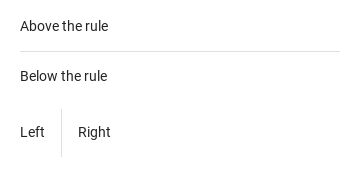
type: "horizontal" (the default) draws the line across the divider's width and keeps margin (16 px by default) above and below it, so its height is thickness + 2 × margin.

Qt capture · image
type · Default
Default execution
QML code
import QtQuick
import Syidax.Core

Item {
    implicitWidth: Math.max(360, childrenRect.width)
    implicitHeight: childrenRect.height

    Column {
        spacing: 24
        Column {
            width: 320
            Text { text: "Above the rule"; font.family: Theme.fontFamily; font.pixelSize: 14; color: Theme.semantic.textDefault }
            SyDivider { width: parent.width }
            Text { text: "Below the rule"; font.family: Theme.fontFamily; font.pixelSize: 14; color: Theme.semantic.textDefault }
        }
        Row {
            height: 48
            Text { anchors.verticalCenter: parent.verticalCenter; text: "Left"; font.family: Theme.fontFamily; font.pixelSize: 14; color: Theme.semantic.textDefault }
            SyDivider { type: "vertical"; height: parent.height }
            Text { anchors.verticalCenter: parent.verticalCenter; text: "Right"; font.family: Theme.fontFamily; font.pixelSize: 14; color: Theme.semantic.textDefault }
        }
    }
}

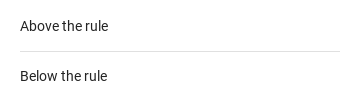
03 inset

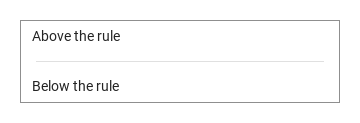
inset: true shortens the line by 16 px at both ends

Qt capture · image
inset · Default
QML code
import QtQuick
import Syidax.Core

Item {
    implicitWidth: Math.max(360, childrenRect.width)
    implicitHeight: childrenRect.height
    property QtObject settings: QtObject {
        id: storyArgs
        property bool inset: true
    }


    Rectangle {
        width: 320
        height: column.implicitHeight
        color: "transparent"
        border.width: 1
        border.color: Theme.semantic.borderBold
        Column {
            id: column
            width: parent.width
            Text { leftPadding: 12; topPadding: 8; text: "Above the rule"; font.family: Theme.fontFamily; font.pixelSize: 14; color: Theme.semantic.textDefault }
            SyDivider { width: parent.width; inset: storyArgs.inset }
            Text { leftPadding: 12; bottomPadding: 8; text: "Below the rule"; font.family: Theme.fontFamily; font.pixelSize: 14; color: Theme.semantic.textDefault }
        }
    }
}

04 thickness · color

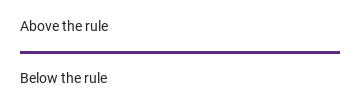
thickness is the line's size across its axis in pixels (1 by default; fractions are allowed); the divider's cross size grows with it since it is thickness + 2 × margin.

Qt capture · image
thickness · color · Default
Default execution
QML code
import QtQuick
import Syidax.Core

Item {
    implicitWidth: Math.max(360, childrenRect.width)
    implicitHeight: childrenRect.height
    // Focused Gallery routes: keep only the selected API and its prerequisites.
    id: featureStory

    property QtObject settings: QtObject {
        id: storyArgs
        property real thickness: 3
        property string color: "#5a2a82"
    }


    Column {
        width: 320
        Text { text: "Above the rule"; font.family: Theme.fontFamily; font.pixelSize: 14; color: Theme.semantic.textDefault }
        SyDivider { id: featureTarget0;
            width: parent.width
            thickness: storyArgs.thickness
            color: storyArgs.color.length > 0 ? storyArgs.color : Theme.divider.horizontalBorderEnabled
        }
        Text { text: "Below the rule"; font.family: Theme.fontFamily; font.pixelSize: 14; color: Theme.semantic.textDefault }
    }
}

API 19

Hover or select an item for its QML example and copy button.

Properties

PropertyTypeDefaultDescription
string"horizontal""horizontal" (across the width) · "vertical" (down the height)
boolfalseShorten the line by 16 px at both ends
real1The line's size across its axis, in px
colordivider tokenThe line color; the horizontal or vertical token by default
real16Space kept on both sides of the line across its axis
bool (read-only)—type !== "vertical"
real (read-only)—16 with inset, else 0

Methods

ItemBehavior / conditions
None.

Signals

ItemBehavior / conditions
None.

Behavior

ItemBehavior / conditions
"horizontal" (across the width) · "vertical" (down the height)
type !== "vertical"
type: "horizontal" (default) draws the line across the divider's width; the divider has no implicit width, so give it one or let a ColumnLayout stretch it (Layout.fillWidth is preset). type: "vertical" draws the line down the divider's height; the implicit width is thickness + 2 × margin and Layout.fillHeight is preset for a RowLayout.
The line's size across its axis, in px
Space kept on both sides of the line across its axis
type: "vertical" draws the line down the divider's height; the implicit width is thickness + 2 × margin and Layout.fillHeight is preset for a RowLayout.
Shorten the line by 16 px at both ends
The line color; the horizontal or vertical token by default
The divider has no signals, no methods, and does not react to input.

Keyboard

ItemBehavior / conditions
SyCard frames a group; SyFlex and the Qt layouts place the dividers between items.