QML
← All components

Banner

Keep an important notice visible across the page, with optional actions and dismissal.

import Syidax.Core.Banner

Supported QML types

TypeDefinition / role
Wide message area for notices and actions within a page.

Learn by example

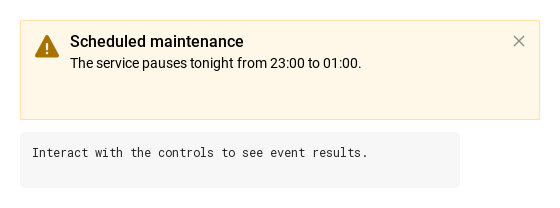
Previews are images of native Qt runs. Use the buttons below each image to view a result.

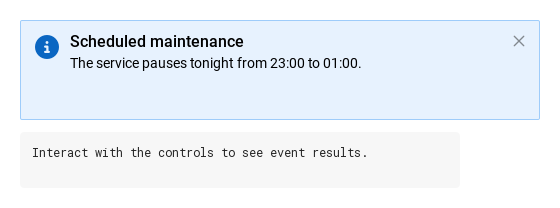
01 Basic composition

SyBannerMessage is a full-width announcement for the whole page

Qt capture · image
Basic composition · Default
Default execution
QML code
import QtQuick
import Syidax.Core

Item {
    component EventLog: Rectangle {
        id: logBox
        property var lines: []
        implicitWidth: 440
        implicitHeight: Math.max(56, logText.implicitHeight + 24)
        radius: 4; color: Theme.semantic.backgroundBold
        function log(value) { lines = lines.slice(-3).concat([String(value)]) }
        Text {
            id: logText; x: 12; y: 12; width: parent.width - 24
            text: logBox.lines.length ? logBox.lines.join("\n") : "Interact with the controls to see event results."
            wrapMode: Text.Wrap; color: Theme.semantic.textDefault
            font.family: Theme.monoFontFamily; font.pixelSize: 12
        }
    }

    implicitWidth: Math.max(360, childrenRect.width)
    implicitHeight: childrenRect.height

    property QtObject settings: QtObject {
        id: storyArgs
        property string variant: "info"
        property string header: "Scheduled maintenance"
        property string message: "The service pauses tonight from 23:00 to 01:00."
        property bool showIcon: true
        property bool closable: true
    }


    Column {
        spacing: 12
        Item {
            width: 520
            height: banner.visible ? banner.implicitHeight : 0
            SyBannerMessage {
                id: banner
                variant: storyArgs.variant
                header: storyArgs.header
                message: storyArgs.message
                showIcon: storyArgs.showIcon
                neutralIcon: Icons.bannerInfo
                closable: storyArgs.closable
                onDismissed: output.log("dismissed")
            }
        }
        EventLog { id: output }
    }

}

02 content · footer

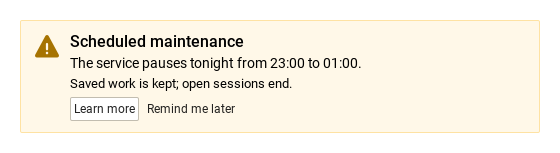
Two places for your own items.

Qt capture · image
content · footer · Default
Default execution
QML code
import QtQuick
import Syidax.Core

Item {
    implicitWidth: Math.max(360, childrenRect.width)
    implicitHeight: childrenRect.height
    // Focused Gallery routes: keep only the selected API and its prerequisites.
    id: featureStory

    Item {
        width: 520
        height: banner.implicitHeight
        SyBannerMessage {
            id: banner
            variant: "warning"
            showIcon: true
            header: "Scheduled maintenance"
            message: "The service pauses tonight from 23:00 to 01:00."
            footer: [
                SyButton { text: "Learn more"; size: "small" },
                SyButton { text: "Remind me later"; variant: "borderless"; size: "small" }
            ]
            Text { text: "Saved work is kept; open sessions end."; width: parent ? parent.width : 0; wrapMode: Text.Wrap; font.family: Theme.fontFamily; font.pixelSize: 13; color: banner.textColor }
        }
    }
}

03 dismissed

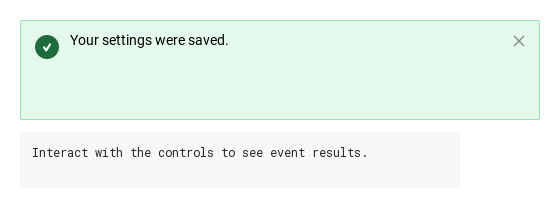
dismissed() is the banner's only signal.

Qt capture · image
dismissed · Default
Default execution
QML code
import QtQuick
import Syidax.Core

Item {
    component EventLog: Rectangle {
        id: logBox
        property var lines: []
        implicitWidth: 440
        implicitHeight: Math.max(56, logText.implicitHeight + 24)
        radius: 4; color: Theme.semantic.backgroundBold
        function log(value) { lines = lines.slice(-3).concat([String(value)]) }
        Text {
            id: logText; x: 12; y: 12; width: parent.width - 24
            text: logBox.lines.length ? logBox.lines.join("\n") : "Interact with the controls to see event results."
            wrapMode: Text.Wrap; color: Theme.semantic.textDefault
            font.family: Theme.monoFontFamily; font.pixelSize: 12
        }
    }

    implicitWidth: Math.max(360, childrenRect.width)
    implicitHeight: childrenRect.height

    Column {
        spacing: 12
        Item {
            width: 520
            height: banner.visible ? banner.implicitHeight : 0
            SyBannerMessage {
                id: banner
                variant: "success"
                showIcon: true
                closable: true
                message: "Your settings were saved."
                onDismissed: output.log("dismissed")
            }
        }
        EventLog { id: output }
    }
}

04 removeBanner

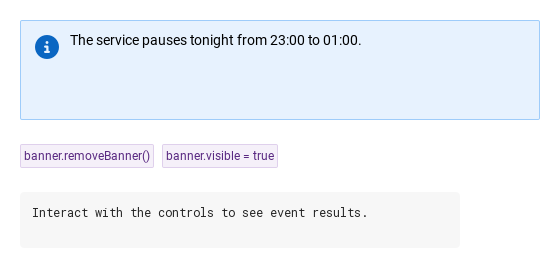
removeBanner() is the one method: it emits dismissed() and then hides the banner (visible = false).

Qt capture · image
removeBanner · Default
QML code
import QtQuick
import Syidax.Core

Item {
    component EventLog: Rectangle {
        id: logBox
        property var lines: []
        implicitWidth: 440
        implicitHeight: Math.max(56, logText.implicitHeight + 24)
        radius: 4; color: Theme.semantic.backgroundBold
        function log(value) { lines = lines.slice(-3).concat([String(value)]) }
        Text {
            id: logText; x: 12; y: 12; width: parent.width - 24
            text: logBox.lines.length ? logBox.lines.join("\n") : "Interact with the controls to see event results."
            wrapMode: Text.Wrap; color: Theme.semantic.textDefault
            font.family: Theme.monoFontFamily; font.pixelSize: 12
        }
    }

    implicitWidth: Math.max(360, childrenRect.width)
    implicitHeight: childrenRect.height

    Column {
        spacing: 24
        Item {
            width: 520
            height: banner.implicitHeight
            SyBannerMessage { id: banner; variant: "info"; showIcon: true; message: "The service pauses tonight from 23:00 to 01:00."; onDismissed: output.log("dismissed") }
        }
        Row {
            spacing: 8
            SyButton { id: exampleControl1;  text: "banner.removeBanner()"; variant: "secondary"; size: "small"; onClicked: banner.removeBanner() }
            SyButton { id: exampleControl2;  text: "banner.visible = true"; variant: "secondary"; size: "small"; onClicked: banner.visible = true }
        }
        EventLog { id: output }
    }
}

05 Success notice

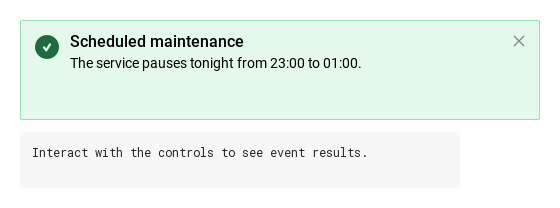
Success notice, configured with variant.

Qt capture · image
Success notice · Result
Default execution
QML code
import QtQuick
import Syidax.Core

Item {
    component EventLog: Rectangle {
        id: logBox
        property var lines: []
        implicitWidth: 440
        implicitHeight: Math.max(56, logText.implicitHeight + 24)
        radius: 4; color: Theme.semantic.backgroundBold
        function log(value) { lines = lines.slice(-3).concat([String(value)]) }
        Text {
            id: logText; x: 12; y: 12; width: parent.width - 24
            text: logBox.lines.length ? logBox.lines.join("\n") : "Interact with the controls to see event results."
            wrapMode: Text.Wrap; color: Theme.semantic.textDefault
            font.family: Theme.monoFontFamily; font.pixelSize: 12
        }
    }

    implicitWidth: Math.max(360, childrenRect.width)
    implicitHeight: childrenRect.height

    property QtObject settings: QtObject {
        id: storyArgs
        property string variant: "success"
        property string header: "Scheduled maintenance"
        property string message: "The service pauses tonight from 23:00 to 01:00."
        property bool showIcon: true
        property bool closable: true
    }


    Column {
        spacing: 12
        Item {
            width: 520
            height: banner.visible ? banner.implicitHeight : 0
            SyBannerMessage {
                id: banner
                variant: storyArgs.variant
                header: storyArgs.header
                message: storyArgs.message
                showIcon: storyArgs.showIcon
                neutralIcon: Icons.bannerInfo
                closable: storyArgs.closable
                onDismissed: output.log("dismissed")
            }
        }
        EventLog { id: output }
    }

}

06 Warning notice

Warning notice, configured with variant.

Qt capture · image
Warning notice · Result
Default execution
QML code
import QtQuick
import Syidax.Core

Item {
    component EventLog: Rectangle {
        id: logBox
        property var lines: []
        implicitWidth: 440
        implicitHeight: Math.max(56, logText.implicitHeight + 24)
        radius: 4; color: Theme.semantic.backgroundBold
        function log(value) { lines = lines.slice(-3).concat([String(value)]) }
        Text {
            id: logText; x: 12; y: 12; width: parent.width - 24
            text: logBox.lines.length ? logBox.lines.join("\n") : "Interact with the controls to see event results."
            wrapMode: Text.Wrap; color: Theme.semantic.textDefault
            font.family: Theme.monoFontFamily; font.pixelSize: 12
        }
    }

    implicitWidth: Math.max(360, childrenRect.width)
    implicitHeight: childrenRect.height

    property QtObject settings: QtObject {
        id: storyArgs
        property string variant: "warning"
        property string header: "Scheduled maintenance"
        property string message: "The service pauses tonight from 23:00 to 01:00."
        property bool showIcon: true
        property bool closable: true
    }


    Column {
        spacing: 12
        Item {
            width: 520
            height: banner.visible ? banner.implicitHeight : 0
            SyBannerMessage {
                id: banner
                variant: storyArgs.variant
                header: storyArgs.header
                message: storyArgs.message
                showIcon: storyArgs.showIcon
                neutralIcon: Icons.bannerInfo
                closable: storyArgs.closable
                onDismissed: output.log("dismissed")
            }
        }
        EventLog { id: output }
    }

}

API 28

Hover or select an item for its QML example and copy button.

Properties

PropertyTypeDefaultDescription
list (default property)—Items stacked under the message, as wide as the text area.
list—Items in a row under the content (4 px apart); the row is hidden when empty.
string"info""info" · "success" · "warning" · "error" · "neutral" — colors and the built-in icon.
string""The 16 px title line; hidden when empty.
string""The 14 px body; hidden when empty.
boolfalseShow the variant icon (neutral needs neutralIcon too).
url""The icon of a neutral banner (an Icons.* url or an SVG file); ignored for other variants.
boolfalseAdds the × that calls removeBanner().
string (read-only)—variant with info resolved to informational.
bool (read-only)—Whether an icon is actually drawn.
read-only—The resolved text color, icon color and icon source.

Methods

MethodDescription
Emits dismissed() and hides the banner (visible = false). No arguments, no return value; emits again if called while already hidden. Bring the banner back with visible = true.

Signals

SignalArgumentsWhen
—The × was pressed or removeBanner() was called — emitted before visible turns false. Not emitted when you set visible = false yourself.

Behavior

ItemBehavior / conditions
Width and height — width is bound to the parent's width (480 px without a parent); assign width or use Layout.fillWidth to override.
info (default, informational colors) · success · warning · error · neutral; it sets the background, border, text and icon colors and, for the four non-neutral variants, the icon.
Show the variant icon (neutral needs neutralIcon too).
The icon of a neutral banner (an Icons.* url or an SVG file); ignored for other variants.
The 16 px title line; hidden when empty.
The 14 px body; hidden when empty.
Items in a row under the content (4 px apart); the row is hidden when empty.
Adds the × that calls removeBanner().
Emits dismissed() and hides the banner (visible = false). No arguments, no return value; emits again if called while already hidden. Bring the banner back with visible = true.
The × was pressed or removeBanner() was called — emitted before visible turns false. Not emitted when you set visible = false yourself.
Closing — the × (closable) calls removeBanner(), which emits dismissed() and then sets visible = false. Nothing else emits dismissed; setting visible yourself is silent. visible = true shows the banner again.
the banner takes no pointer input except the ×; your footer buttons report their own clicks.

Keyboard

ItemBehavior / conditions
SyInlineMessage for feedback on one control, SyToast for passing notifications, SyButton for footer actions, SyIcon / Icons.banner* for a neutral icon.