QML
← All components

Nav

Navigate between application sections using a vertical list with groups and expandable branches.

import Syidax.Core.Nav

Supported QML types

TypeDefinition / role
Vertical navigation container; reports selections for the application to route.
One destination row, highlighted when its value is active.
Expandable navigation branch containing nested rows.
Titled section grouping navigation rows.

Learn by example

Previews are images of native Qt runs. Use the buttons below each image to view a result.

01 Basic composition

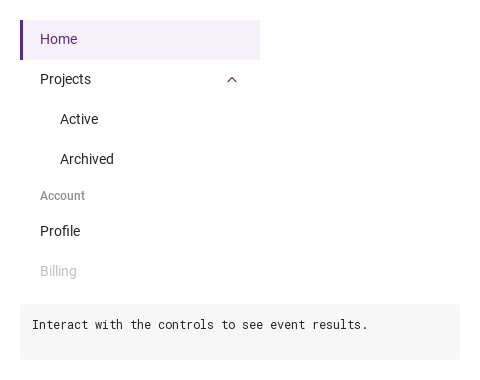
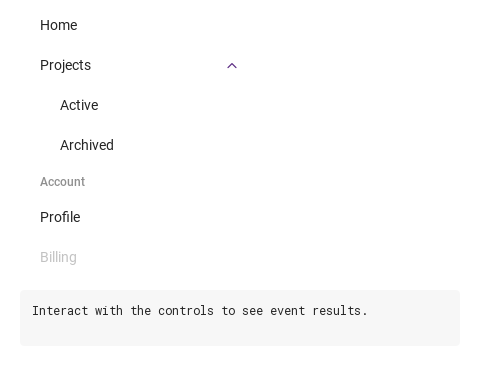
SyNav is a vertical navigation list: SyNavItem rows, SyNavSub branches that fold their rows one level deeper under a title with a chevron, and SyNavGroup sections that put a title over rows at the same depth.

Qt capture · image
Basic composition · Default
Default execution
QML code
import QtQuick
import Syidax.Core

Item {
    component EventLog: Rectangle {
        id: logBox
        property var lines: []
        implicitWidth: 440
        implicitHeight: Math.max(56, logText.implicitHeight + 24)
        radius: 4; color: Theme.semantic.backgroundBold
        function log(value) { lines = lines.slice(-3).concat([String(value)]) }
        Text {
            id: logText; x: 12; y: 12; width: parent.width - 24
            text: logBox.lines.length ? logBox.lines.join("\n") : "Interact with the controls to see event results."
            wrapMode: Text.Wrap; color: Theme.semantic.textDefault
            font.family: Theme.monoFontFamily; font.pixelSize: 12
        }
    }

    implicitWidth: Math.max(360, childrenRect.width)
    implicitHeight: childrenRect.height

    property QtObject settings: QtObject {
        id: storyArgs
        property string activeValue: "home"
        property bool disabled: false
    }

    readonly property string members: [
        "SyNavItem { text: " + JSON.stringify("Home") + "; value: \"home\" }",
        "SyNavSub {",
        "    title: " + JSON.stringify("Projects") + "; value: \"projects\"; open: true",
        "    SyNavItem { text: " + JSON.stringify("Active") + "; value: \"active\" }",
        "    SyNavItem { text: " + JSON.stringify("Archived") + "; value: \"archived\" }",
        "}",
        "SyNavGroup {",
        "    title: " + JSON.stringify("Account"),
        "    SyNavItem { text: " + JSON.stringify("Profile") + "; value: \"profile\" }",
        "    SyNavItem { text: " + JSON.stringify("Billing") + "; value: \"billing\"; disabled: true }",
        "}"
    ].join("\n")

    Column {
        spacing: 12
        SyNav {
            disabled: storyArgs.disabled
            onSelected: (value) => output.log(value)
            Binding on activeValue { value: storyArgs.activeValue }
            SyNavItem { text: "Home"; value: "home" }
            SyNavSub {
                title: "Projects"; value: "projects"; open: true
                SyNavItem { text: "Active"; value: "active" }
                SyNavItem { text: "Archived"; value: "archived" }
            }
            SyNavGroup {
                title: "Account"
                SyNavItem { text: "Profile"; value: "profile" }
                SyNavItem { text: "Billing"; value: "billing"; disabled: true }
            }
        }
        EventLog { id: output }
    }

}

02 SyNavSub

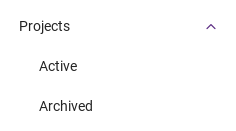
SyNavSub is an expandable branch.

Qt capture · image
SyNavSub · Default
QML code
import QtQuick
import Syidax.Core

Item {
    implicitWidth: Math.max(360, childrenRect.width)
    implicitHeight: childrenRect.height
    property QtObject settings: QtObject {
        id: storyArgs
        property string title: "Projects"
        property bool open: true
    }

    
    SyNav {
        width: 240
        SyNavSub {
            title: storyArgs.title
            Binding on open { value: storyArgs.open }
            SyNavItem { text: "Active"; value: "active" }
            SyNavItem { text: "Archived"; value: "archived" }
        }
    }
}

03 SyNavGroup

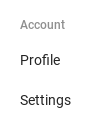
SyNavGroup labels a section without adding indentation or expand/collapse behaviour.

Qt capture · image
SyNavGroup · Default
Default execution
QML code
import QtQuick
import Syidax.Core

Item {
    implicitWidth: Math.max(360, childrenRect.width)
    implicitHeight: childrenRect.height
    property QtObject settings: QtObject {
        id: storyArgs
        property string title: "Account"
    }

    
    SyNav {
        width: 240
        SyNavGroup {
            title: storyArgs.title
            SyNavItem { text: "Profile"; value: "profile" }
            SyNavItem { text: "Settings"; value: "settings" }
        }
    }
}

04 selected

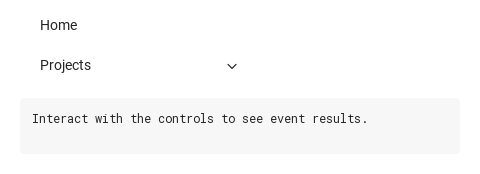
SyNav has one signal, selected(value: string), and it fires in two situations:

Qt capture · image
selected · Default
Default execution
QML code
import QtQuick
import Syidax.Core

Item {
    component EventLog: Rectangle {
        id: logBox
        property var lines: []
        implicitWidth: 440
        implicitHeight: Math.max(56, logText.implicitHeight + 24)
        radius: 4; color: Theme.semantic.backgroundBold
        function log(value) { lines = lines.slice(-3).concat([String(value)]) }
        Text {
            id: logText; x: 12; y: 12; width: parent.width - 24
            text: logBox.lines.length ? logBox.lines.join("\n") : "Interact with the controls to see event results."
            wrapMode: Text.Wrap; color: Theme.semantic.textDefault
            font.family: Theme.monoFontFamily; font.pixelSize: 12
        }
    }

    implicitWidth: Math.max(360, childrenRect.width)
    implicitHeight: childrenRect.height


    Column {
        spacing: 12
        SyNav {
            width: 240
            onSelected: (value) => output.log(("selected: %1").arg(value))
            SyNavItem { text: "Home"; value: "home" }
            SyNavSub {
                title: "Projects"; value: "projects"
                SyNavItem { text: "Active"; value: "active" }
            }
        }
        EventLog { id: output }
    }
}

05 setActive · setOpen · setClose · setTrigger

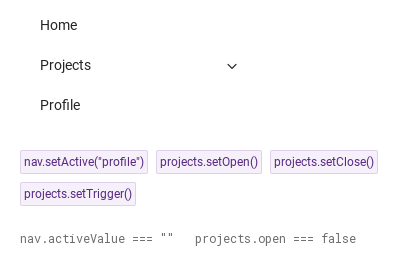
SyNav.setActive(value) sets activeValue, so the row whose value matches becomes the active one (a value that matches no row leaves every row inactive).

Qt capture · image
setActive · setOpen · setClose · setTrigger · Default
QML code
import QtQuick
import Syidax.Core

Item {
    implicitWidth: Math.max(360, childrenRect.width)
    implicitHeight: childrenRect.height
    // Focused Gallery routes: keep only the selected API and its prerequisites.
    id: featureStory

    Column {
        spacing: 24
        SyNav {
            id: nav
            width: 240
            SyNavItem { text: "Home"; value: "home" }
            SyNavSub { id: projects; title: "Projects"; value: "projects"; SyNavItem { text: "Active"; value: "active" } }
            SyNavItem { text: "Profile"; value: "profile" }
        }
        Flow {
            width: 460
            spacing: 8
            SyButton { id: exampleControl1;  visible: true; text: "nav.setActive(\"profile\")"; variant: "secondary"; size: "small"; onClicked: nav.setActive("profile") }
            SyButton { id: exampleControl2;  visible: true; text: "projects.setOpen()"; variant: "secondary"; size: "small"; onClicked: projects.setOpen() }
            SyButton { id: exampleControl3;  visible: true; text: "projects.setClose()"; variant: "secondary"; size: "small"; onClicked: projects.setClose() }
            SyButton { visible: true; text: "projects.setTrigger()"; variant: "secondary"; size: "small"; onClicked: projects.setTrigger() }
        }
        Text {
            text: "nav.activeValue === " + JSON.stringify(nav.activeValue) + "   projects.open === " + projects.open
            font.family: Theme.monoFontFamily
            font.pixelSize: 12
            color: Theme.semantic.textSubtle
        }
    }
}

06 Active navigation route

Active navigation route, configured with activeValue.

Qt capture · image
Active navigation route · Result
Default execution
QML code
import QtQuick
import Syidax.Core

Item {
    component EventLog: Rectangle {
        id: logBox
        property var lines: []
        implicitWidth: 440
        implicitHeight: Math.max(56, logText.implicitHeight + 24)
        radius: 4; color: Theme.semantic.backgroundBold
        function log(value) { lines = lines.slice(-3).concat([String(value)]) }
        Text {
            id: logText; x: 12; y: 12; width: parent.width - 24
            text: logBox.lines.length ? logBox.lines.join("\n") : "Interact with the controls to see event results."
            wrapMode: Text.Wrap; color: Theme.semantic.textDefault
            font.family: Theme.monoFontFamily; font.pixelSize: 12
        }
    }

    implicitWidth: Math.max(360, childrenRect.width)
    implicitHeight: childrenRect.height

    property QtObject settings: QtObject {
        id: storyArgs
        property string activeValue: "settings"
        property bool disabled: false
    }

    readonly property string members: [
        "SyNavItem { text: " + JSON.stringify("Home") + "; value: \"home\" }",
        "SyNavSub {",
        "    title: " + JSON.stringify("Projects") + "; value: \"projects\"; open: true",
        "    SyNavItem { text: " + JSON.stringify("Active") + "; value: \"active\" }",
        "    SyNavItem { text: " + JSON.stringify("Archived") + "; value: \"archived\" }",
        "}",
        "SyNavGroup {",
        "    title: " + JSON.stringify("Account"),
        "    SyNavItem { text: " + JSON.stringify("Profile") + "; value: \"profile\" }",
        "    SyNavItem { text: " + JSON.stringify("Billing") + "; value: \"billing\"; disabled: true }",
        "}"
    ].join("\n")

    Column {
        spacing: 12
        SyNav {
            disabled: storyArgs.disabled
            onSelected: (value) => output.log(value)
            Binding on activeValue { value: storyArgs.activeValue }
            SyNavItem { text: "Home"; value: "home" }
            SyNavSub {
                title: "Projects"; value: "projects"; open: true
                SyNavItem { text: "Active"; value: "active" }
                SyNavItem { text: "Archived"; value: "archived" }
            }
            SyNavGroup {
                title: "Account"
                SyNavItem { text: "Profile"; value: "profile" }
                SyNavItem { text: "Billing"; value: "billing"; disabled: true }
            }
        }
        EventLog { id: output }
    }

}

API 54

Hover or select an item for its QML example and copy button.

Properties · SyNav

PropertyTypeDefaultDescription
list (default property)—The entries declared inside: SyNavItem, SyNavSub, SyNavGroup, in order
string""The active row's value. Set it to follow the route; a click sets it too
boolfalseEvery row and branch header inert
var[]Every SyNavItem and SyNavSub in order, nested ones included (no groups); maintained by the nav

Properties · SyNavItem

PropertyTypeDefaultDescription
list (default property)—Items placed after the text (an icon, a badge)
string""The row label (hidden when empty)
string""What a click reports and what activeValue is compared with; an empty value is never active
boolfalseGreyed, ignores clicks and keys
int0The nesting level — set by the nav; 20 px of indent per level
bool (read-only)—activeValue equals this row's non-empty value
bool (read-only)—disabled on the row or on the nav
bool (read-only)—Pointer over the row
bool (read-only)—keyboard focus
varnullThe owning SyNav (set by the nav)

Properties · SyNavSub

PropertyTypeDefaultDescription
list (default property)—The rows (and groups or branches) one level deeper
string""The header text
string""Reported through selected when the branch opens or closes
boolfalseThe branch state; set it to open or close silently, read it to know
boolfalseThe header inert; rows inside keep their own state
int0The nesting level — set by the nav
bool (read-only)—disabled on the branch or on the nav
bool (read-only)—Pointer over the header
bool (read-only)—the header has keyboard focus
varnullThe owning SyNav (set by the nav)

Properties · SyNavGroup

PropertyTypeDefaultDescription
list (default property)—The rows under the title, at the same depth
string""The section title (12 px medium, in a 32 px row)
int0The nesting level — set by the nav
varnullThe owning SyNav (set by the nav)

Methods

MethodDescription
Sets activeValue; the matching row becomes active, no signal
true: makes this row the active one; false: clears activeValue. No signal
Opens the branch and reports its value; ignored while disabled or already open
Closes the branch and reports its value; ignored when already closed (allowed while disabled)
setClose() when open, else setOpen()

Signals

SignalArgumentsWhen
value: stringAn enabled row was clicked (or Space / Enter on it) — activeValue is already that value — or a branch opened or closed (its value; activeValue unchanged). Not when activeValue, setActive() or a branch's open is set from code
value: stringThis row was clicked; emitted just before the nav's
value: stringThis branch opened or closed by the user or by its methods; emitted just before the nav's

Behavior

ItemBehavior / conditions
What a click reports and what activeValue is compared with; an empty value is never active
The active row's value. Set it to follow the route; a click sets it too
This row was clicked; emitted just before the nav's
Sets activeValue; the matching row becomes active, no signal
The header text
The branch state; set it to open or close silently, read it to know
Opens the branch and reports its value; ignored while disabled or already open
Closes the branch and reports its value; ignored when already closed (allowed while disabled)
setClose() when open, else setOpen()
This branch opened or closed by the user or by its methods; emitted just before the nav's
Reported through selected when the branch opens or closes
A SyNavGroup draws a 32 px title row (12 px medium text, indented like its rows) and then the rows declared inside it at the same depth. It has no state and reports nothing.
Every row and branch header inert
The nav is a column: give it a width; its height is the sum of its rows.
Tab moves through the enabled rows and branch headers (a focused entry shows a 1 px outline). On a row, Space / Enter pick it. On a branch header, Space / Enter toggle it, Right opens it, Left closes it. There is no Up / Down movement; use Tab.
Every SyNavItem and SyNavSub in order, nested ones included (no groups); maintained by the nav
An enabled row was clicked (or Space / Enter on it) — activeValue is already that value — or a branch opened or closed (its value; activeValue unchanged). Not when activeValue, setActive() or a branch's open is set from code

Keyboard

ItemBehavior / conditions
SyLayoutSider is the usual home of a nav; SyMenu is the popup counterpart for actions; SyBreadcrumb shows the path the nav led to.